The content on the Volunteer Registration Portal is integral to engaging volunteers in any Point-in-Time (PIT) Count. The landing page needs to present the What, When, Where, and Why of the Count process. A sample Volunteer Portal can be found here and, once added to the Count Activity, the content for the portal can be customized by a Count Administrator Sample language for the landing page of the portal, as well as the Welcome Email that is sent once someone registers, can be found in this document.
How to Manage the Volunteer Portal Content
Once an Admin has signed into their account on the Command Center, click on the Activities button on the left menu. Additionally, the desired activity may be present in the most recently used selection left-of-center of the home page.
.png) |
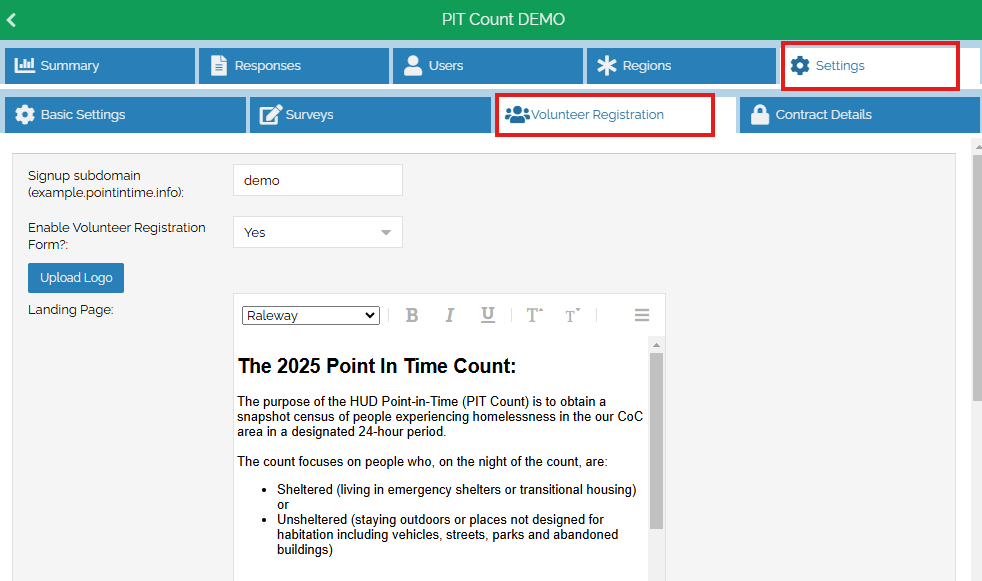
Once inside Activities, select the activity you wish to update. After opening the PIT activity, select the Settings tab and then the Volunteer Registration tab under that. This will bring up a standard word format editor that can be used to update any content on your website. Additionally, you can choose to disable or enable the website. This is helpful if you are making major changes that volunteers need to know before signing up, or if you are no longer accepting volunteers for this PIT Count.
 |
How to Upload a Custom Logo to the Volunteer Portal
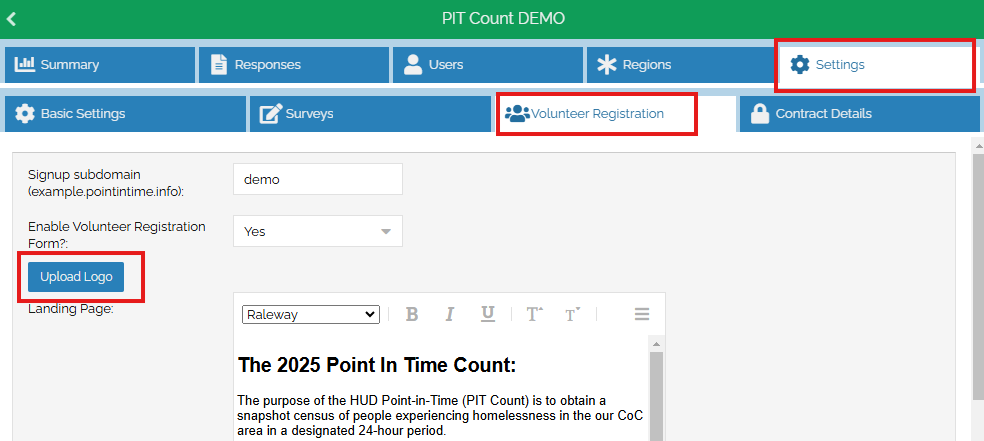
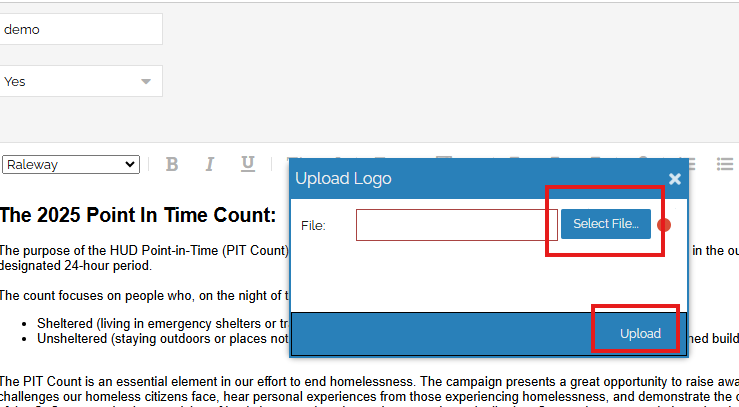
If you would like to customize your volunteer registration portal by including your community's logo, you can do so on this same page. In the first image below, select the Upload Logo button. The second image demonstrates selecting the file and then uploading. The best image formats are 500 x 250 pixels.
How to Make Changes to the Volunteer Registration Survey
In the event that you want to make changes to wording of questions on the Volunteer Registration, you can follow the steps on editing & managing survey questions. If you want to remove or add questions, you can review our guidance on customizing surveys for a better idea of that process.
How to Manage the Welcome Email Content
The second text box, shown below, allows Count Administrators to author the Welcome Email that volunteers will receive. The Welcome Email is an opportunity to provide surveyors with vital information such as how to download the Counting Us app, how to conduct a Know Location Survey and any additional localized information that might prepare them for the PIT Count. This may include reminder information of the times and sites for training, or how to contact their administrative team. The editing process is the same as above.
.png) |
It is important to note, to click the blue bar at the bottom of the page that says Update any time any changes are made to any content on this page. You may need to scroll down on your browser to see this.
To update the image at the top of the landing page or for any additional information, assistance in editing, or if you have questions about changing the content of the survey page itself, please submit a help desk ticket and a member of our team will assist you.