How to identify and resolve PIT Count clients with unknown household types
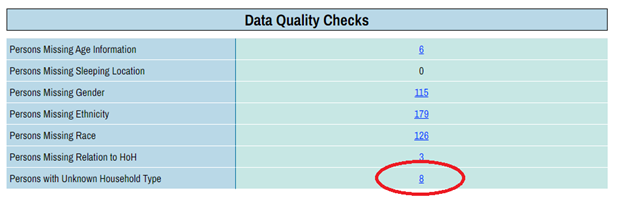
Identifying clients with unknown household type1. Run the PIT report, scroll down to the Data Quality Check section, and click on the figure for the “Persons with Unknown Household Type”. |
||
 |
||
|
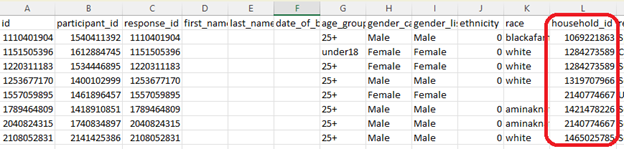
2. After the question detail opens, click on Export Results. This will provide an Excel spreadsheet that includes details of every survey for which there was no household type assigned. |
||
 |
||
|
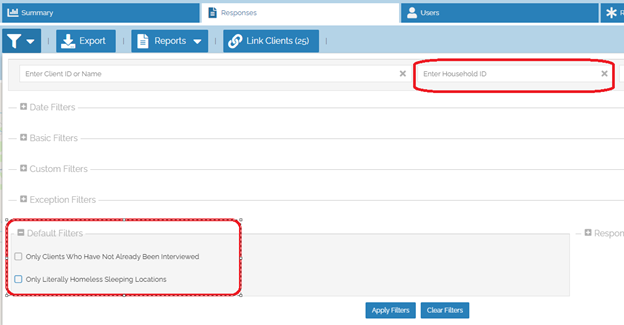
3. From the Responses tab, look up the household ID for all clients with an unknown household type. To do this, enter the household ID shown in the Excel spreadsheet above into the Household ID field. Next, scroll down on the Filters tab and uncheck the default filters of “Only Clients who have been already interviewed” and “Only Literally Homeless Sleeping Locations” as shown below.
|
||
 |
||
|
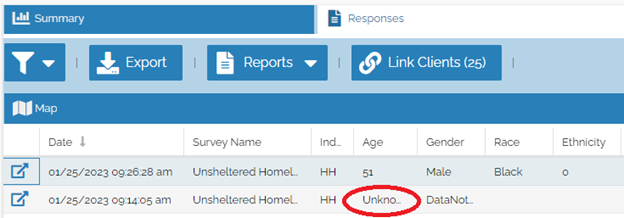
4. Open up the survey record for the person(s) who are not already showing up on the list of clients with an Unknown Household Type. For clients with an Unknown Household Type, it is common for the others that are in the household to have either already been interviewed, or to be sleeping in a place that is meant for habitation. In either case, the Age is often displayed as “Unknown” for the other household members. |
||
 |
||
|
Resolving clients with unknown household type There are a few options to resolve these unknown household types from appearing: a. Update the response to the “Have you already been interviewed for the Point In Time Count?” or the “Where were you sleeping on the night of the count?” questions so that the survey is to be included. b. Archive the data for the household members that do not meet the criteria to be included in the count. OR c. Re-enter the survey information for the person who was to be counted as an individual survey and archive the current survey.
To learn more about why there may be an Unknown Household Type, please see this FAQ. |
||