Beginning with the 2025 Point-in-Time count, we’ve offered the ability for communities to allow their volunteers to sign up for multiple regions through the volunteer portal. Volunteers can sign up for as many or as few regions as they want. Volunteers can also be assigned to multiple teams in different regions.
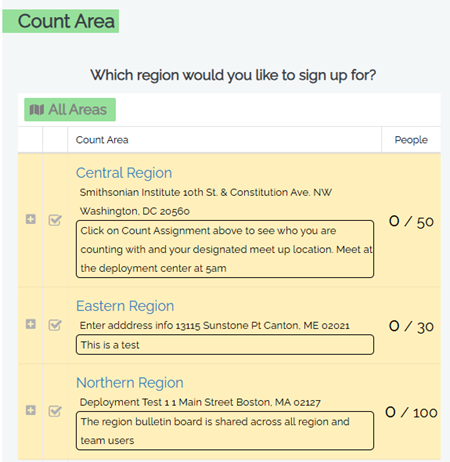
When multiple regions are enabled, the region choice in the Volunteer Registration Portal will look like this:
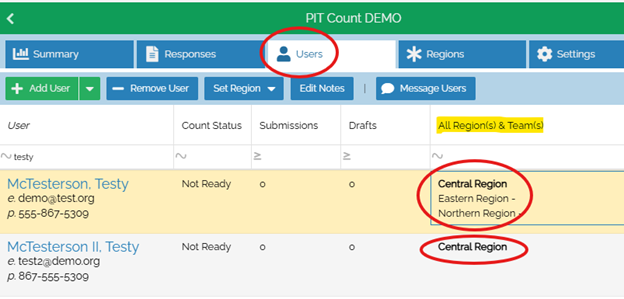
Once the users have signed up, you can see which region(s) they have selected, and identify which region they are actively assigned to by whichever region is in bold within the “All Region(s) & Team(s)” column in the Users tab in the Command Center. Note that in the screenshot below, the highlighted user has three regions, but only the first is in bold. In this example, Central Region is the user’s active assignment, and unless the user changes their active assignment, all their surveys will be associated with Central Region.
- Guidance on Region creation, management, and assignment for Count Administrators can be found here.
- To learn more about creating and managing Count Teams and Coverage Areas, click here.
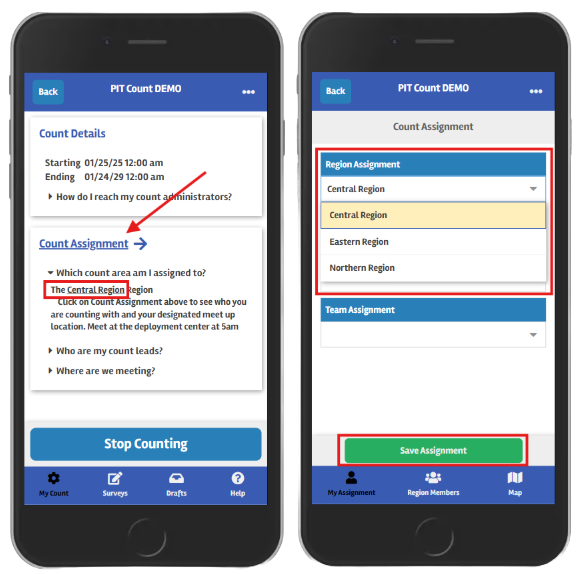
Users can switch between their count assignments in the Counting Us App, under the My Count tab at the bottom. First, tap on the Count Assignment link, then choose a different region from the Region Assignment drop-down menu. Finally, tap the Save button. Now the user is counting under a different region.